
 Doc Summary

This section allows you to manage home care services comprehensively. You can create customized home care packages, manage subscribed patients, and generate various dynamic reports.
1. Home Care Setting #
Here, you can create new packages and manage existing ones.
Steps to Create a New Package:
Click on the Add Package button.
Enter the Package Name.
Input the From Time and End Time (these times are related to the patient portal access).
Set the Price for the package.
The package will be created as a subcategory, and you can generate invoices using the service name and price.
2. Subscriber #
Manage your subscribed patients easily.
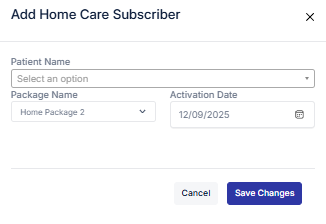
Steps to Add a Subscriber:
Click on the Add Subscriber button.
Select the Patient Name.
Choose the Package.
Input the Activation Date.
Click Submit to add the subscriber.
Editing or Upgrading a Subscriber Package:
Click the Edit icon next to the subscriber’s name.
Update the necessary information.
Click Update to save changes.
Deleting a Subscriber:
Click the Delete icon next to the subscriber’s name.
3. Report #
Generate and customize reports for home care services.
Steps to Generate a Report:
Click on the Get Report button.
Input the From Date and To Date for the desired report period.
Click Generate to view the report.


