
 Doc Summary

1. Patient Registration #
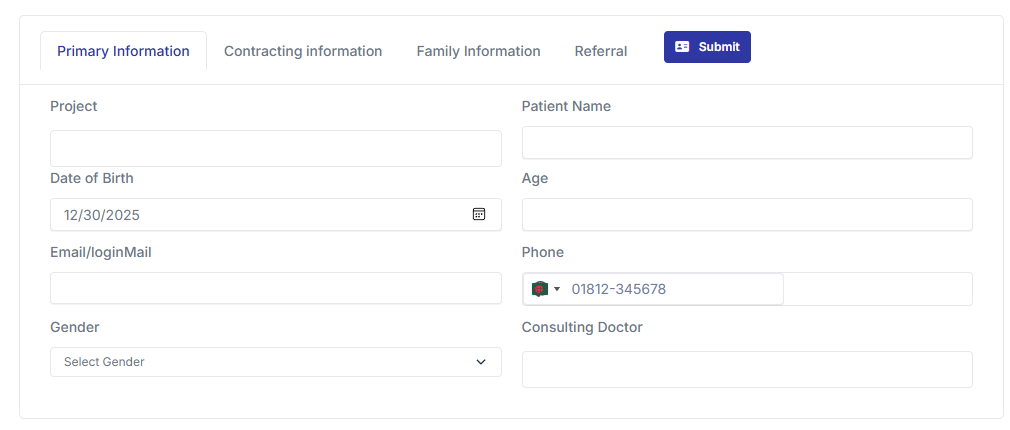
In the Patient Registration section, you can add patient details. This patient information is connected to various modules like invoice, prescription, patient portal, roster, etc.
To register a patient
I. Primary Information #
Project: Select a project from Setting > Company Setting > Project.
Name: Enter the patient’s name.
Date of Birth: Input the Date of Birth (DOB). The system will automatically calculate the age.
If you input the age, the system will automatically calculate the DOB.
Login Email or Phone Number: Enter the login email or phone number. The phone number is mandatory.
Gender: Select the patient’s gender.
Consulting Doctor: Choose the consulting doctor from Setting > Doctor Database
II. Contracting information #
City: Select the city from Setting > Company Setting > City.
Thana: Select the Thana from Setting > Company Setting > Thana.
Present Address: Enter the present address.
Additional Input: Add any other necessary information.
III. Family Information #
Doctor Contacting Number: Enter the doctor’s contact number. This will be added to the prescription and other sections if needed.
IV. Referral #
Referral Information: Enter any referral information if necessary.
Email and SMS Notifications
Email Notification:
Upon registration, an email is sent to the patient’s email address. The email includes: User ID, Password, Login information, Website information.
SMS Notification:
An SMS is sent to the patient’s phone number with login details and website information.


